Inspecting the document #
TLDR; #
go-asyncapi doc inspect inspects the AsyncAPI entities physical structure in a document and related documents.
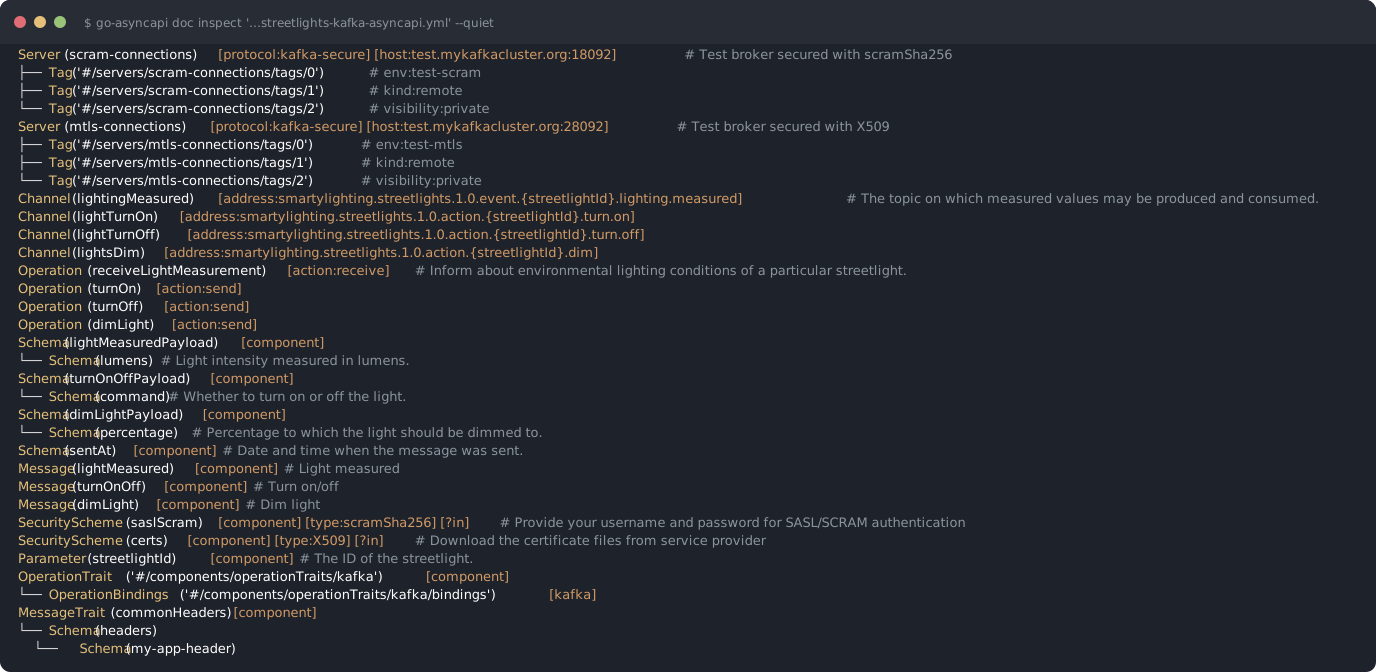
Default console output
go-asyncapi doc inspect 'https://raw.githubusercontent.com/asyncapi/spec/refs/heads/master/examples/streetlights-kafka-asyncapi.yml' --quiet
Arguments #
The command takes a single location — a document file or URL, optionally with a JSON pointer to a target subtree. Both YAML and JSON documents are supported. By default all entities in the document are considered, but if a JSON pointer is provided, only that subtree is inspected.
By default the hierarchy is drawn as a graphical tree. Every entity shows its type, name, description and some
additional information. A $ref is displayed as a link, showing only where it points to.
-l arg turns the output into a plain text list, suitable for scripting. -s STYLE sets the output style:
human (default), json-pointer or yq expression.
To filter the output, use -e ENTITIES to show only certain entity kinds (-e help to list all possible values),
and --main or --components to show only entities from the root sections (servers, channels, operations)
or from the components section.
The
$reflocator options are described in the reference locator article.
Recursive mode #
In recursive mode (-r flag) the command follows all $refs and shows the full entity hierarchy.
-R enables recursive mode like -r, but additionally shows the full hierarchy of JSON Schema objects and expands
possible $ref chains.
In recursive mode the $refs pointing to URLs are forbidden — pass -F to allow following them.
Usage #
Inspect the whole document:
go-asyncapi doc inspect asyncapi.yaml
Inspect only a single subtree:
go-asyncapi doc inspect 'asyncapi.yaml#/components/messages/UserSignedUp'
Fully expand all $refs and nested schemas:
go-asyncapi doc inspect asyncapi.yaml -R
List only the channels and operations from the root sections, as yq expressions:
go-asyncapi doc inspect asyncapi.yaml --main -e channel,operation -l -s yq