Moving the nodes #
TLDR; #
go-asyncapi doc mv moves the nodes within a document or between several documents the same way you would move files in a
Unix shell. It supports globbing, recursive moving, conflict resolution (automatic and interactive),
and automatically keeps all affected $refs correct after the move.
To copy nodes instead of moving them, see the
doc cpcommand.
Arguments #
The command accepts one or more locations — a path to a node in JSON Pointer format, or a globbing pattern. Globbing supports *, **, etc.
(see the glob syntax). Both YAML and JSON documents are supported.
By default the last location is the destination and the others are the sources. A moved node is added as a
new key in a destination object, or appended as a new item to a destination array. When the destination path does
not exist, pass -a to create it.
Usage #
Move active servers from one document into another:
go-asyncapi doc mv 'file1.yaml#/servers' 'file2.yaml'
Rename a node within the same document:
go-asyncapi doc mv 'file1.yaml#/servers/foo' 'file1.yaml#/servers/bar'
Move every active server into another document’s components section (use -a to create it if missing):
go-asyncapi doc mv -a 'file1.yaml#/servers/*' 'file2.yaml#/components/servers'
When -t is given, all arguments are treated as sources — handy for piping a list of nodes:
cat nodes.txt | xargs go-asyncapi doc mv -a -t file2.yaml
Leaving a link behind #
Pass -l to embed a $ref at the node’s original location that points to its new location.
This is useful when parts of the original document should keep resolving the node in place after it has been moved
out. The flag does not apply to nodes pulled in recursively (dependencies) — only to the matched nodes themselves.
go-asyncapi doc mv -l 'file1.yaml#/servers/foo' 'file2.yaml'
Recursive mode #
By following $refs, the command can also move the nodes a matched node depends on:
-r— move all dependencies recursively.-S— move only the direct dependencies (resolve$refs in the matched nodes, but do not descend further).-H— move only the dependencies, excluding the matched nodes themselves. Combine it with-ror-S, otherwise nothing is moved.
External and remote $refs are allowed to be followed by doc mv.
Making the inner node a separate component once referred from somewhere #
On recursive moving, command turns every $ref that points to any inner node inside a component (components/* section)
or active entity (servers, channels, operations sections) into a separate component.
The reason is if it would move the inner node verbatim to the same path without the parent node,
it could make the destination document invalid.
For example, once we meet a $ref pointing to #/servers/foo/bindings, moving this node alone to #/servers/foo/bindings
without #/servers/foo contents would produce an invalid server entity because of lack of “host” and “protocol” required fields.
Instead, the command transforms #/servers/foo/bindings into #/components/serverBindings/generatedName and updates $refs
to point to the new location.
Conflict resolution #
If a node is already exists on destination path and is not equal to source node, the command reports a conflict.
By default, command exits with an error. By passing the -f flag, you can
instruct the command to overwrite the existing node on conflict.
If you want to resolve each conflict interactively, pass -i.
Rewriting the $refs #
After moving, the command rewrites $refs so they remain correct in every affected document.
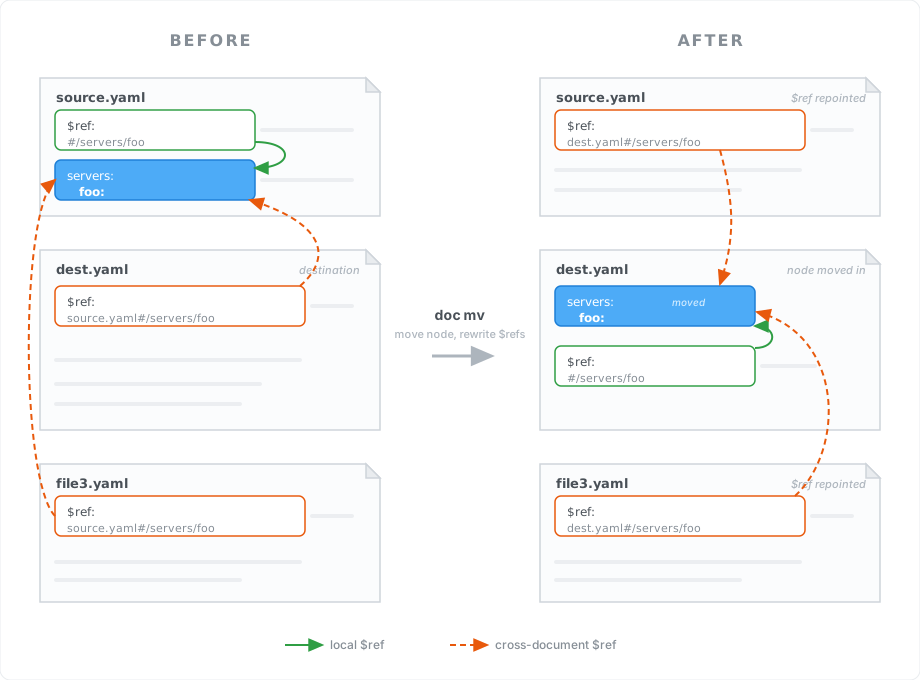
A $ref that pointed at the moved node — whether it lived in the source document (e.g. source.yaml) or in an unrelated one
(e.g. file3.yaml) — is repointed to the node’s new location. Use --disable-rewriting to keep all $refs
untouched.